




I Built a Fullstack App in 5 Days Using GenAI: Here’s What I Learned
Yes, I’ve also used those famous GenAI platforms—to generate photos, create ad copy, study for exams, and even check on my dog’s health. But in early February, I asked myself: could I actually build this crazy web app that’s been keeping me up at night for months with GenAI’s help?
At first, I didn’t think it was possible. Let me give you some context: I graduated with a degree in business administration in 2015, not computer science. That said, I’ve always been a tech enthusiast and self-learner. I’ve spent twelve years working in digital, and as a Senior Product Manager, I’m experienced in leading and making decisions on complex tech projects (Cloud, ML, etc.). But when it comes to actually coding? The closest I’ve gotten is editing a CSS file with some basic HTML knowledge.
Despite my doubts, I decided to take on the challenge. The goal was relatively straightforward: build ‘Hey DJ Fer’, a fullstack web app (with both backend and frontend) that lets any Spotify user paste a song link and get a prediction of its musical genre based on my personal classification system of 50 categories. Simple concept, but with some hidden complexities.
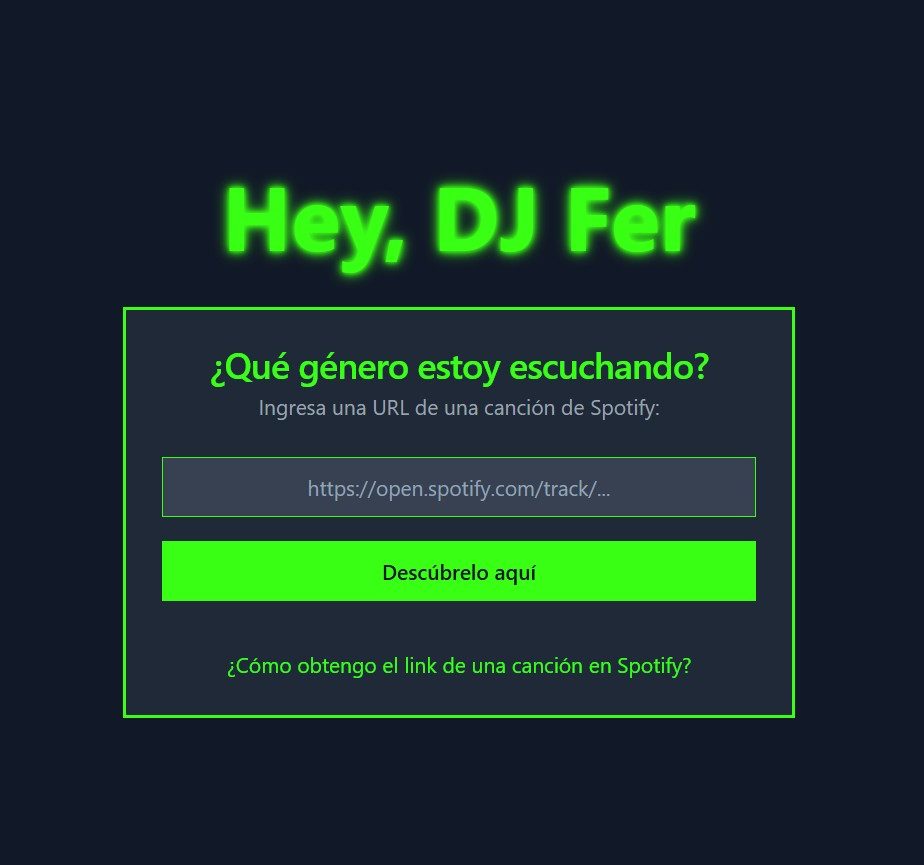
While this post focuses on what I learned using GenAI, let me quickly outline the requirements I set for this project. First, I’d use data from Spotify’s public API as input for my model’s predictions. Second, I’d build my ML model using my own database—10,000 records with 20 variables, where I’ve personally classified music I listen to into 50 genre labels (I built this database between 2012 and 2023). Finally, and just as importantly, I wanted the model’s predictions to run in real time, which meant deploying the model to the Cloud.
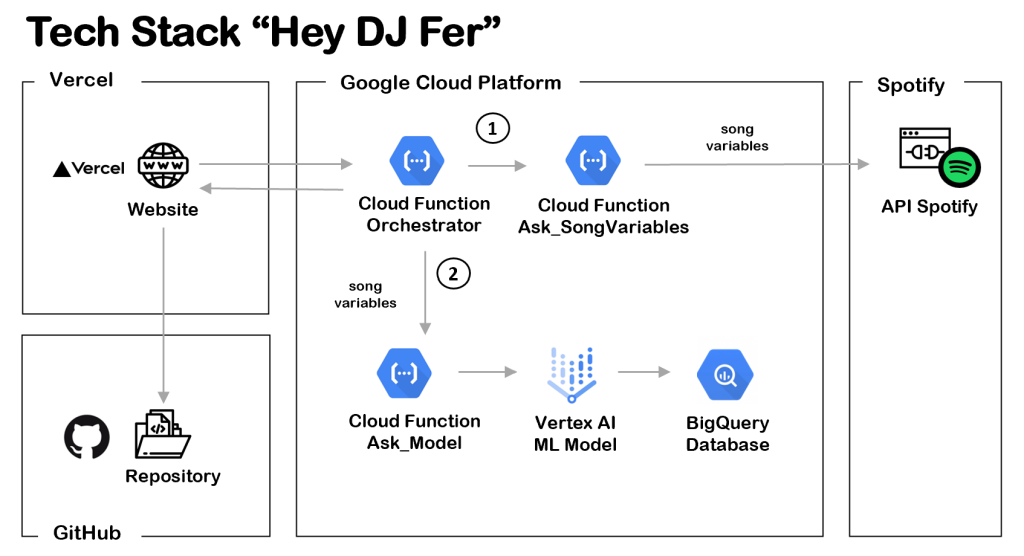
Below you’ll also find a diagram of my app’s architecture. For the geeks out there, I’ll drop links to my project resources at the end of the article. Moving forward, this article will focus on what I learned using GenAI platforms (ChatGPT-4-turbo, Deepseek-V3, Vercel-v0) during the 5 days I spent tackling this project.
* * *
1) The Art of Prompting: Go from Macro to Micro
You know what they say: the more context you give AI chatbots, the better. This is 100% true, but I’d add an important detail. When tackling a project of this magnitude, it really helps to start with a prompt that clearly defines your project’s plan and flow. It doesn’t have to be 100% precise, but it will help ChatGPT or Deepseek recommend a useful stack of tools and steps for your goals. After this initial broad prompt, you can ask it to tackle one stage at a time.
Personal example: I started the project by simply describing the need to “create a model to classify songs,” but later realized it would have been more organized to begin with a prompt providing a general overview of the project, then tackle each stage specifically. Because I omitted these other relevant details, I had to iterate on the web app’s architecture at least a couple of times.

2) When You Run Out of Tokens, Visit the AI Chatbot Next Door
A key part of this project was my intention to do it with free tools. This became a major constraint as hours passed, because with intensive use of these platforms, I repeatedly hit the so-called “token limit.” As you know, ChatGPT has limitations on the amount of text or data you can use to interact with it (see more detail here). The truth is, amid all the buzz generated by Deepseek, I couldn’t help but go to “the store across the street” once I hit the free version limit on OpenAI. Fortunately for me, Deepseek showed comparable performance and seemed to never reach the “tokens used” cap. Though every so often I’d get responses saying “the server is busy.” In short, if you want to keep your costs at zero, make sure you have these LLM cousins on hand: Perplexity, Claude, or Gemini.
Personal example: I tried to document all my project prompts in just one ChatGPT window, but when I hit the token limit, I had to copy the chatbot’s last response and jump to Deepseek with a bit of context so I wasn’t starting from scratch. I know jumping between chatbots can be disorienting for some—I’d recommend evaluating the paid version if you want to work without interruptions.

3) Before Just Asking for Code, Focus on Learning
The moment had finally arrived to start programming. On ChatGPT’s suggestion, I used Python to build the app’s backend, despite my limited experience with this programming language. So I began writing my first prompts asking the chatbot for Python code that would let me create my first APIs. I won’t lie: at first it seemed too dense to understand. However, as hours passed, I started detecting patterns in how functions and variables were structured. Right away I began asking ChatGPT conceptual questions to understand the code’s logic, and within two days I’d started catching errors the chatbot made when delivering code. For all these reasons, my suggestion is don’t just see GenAI platforms as mere code factories, but as potential teachers.
Personal example: I loved how ChatGPT explained the logic behind the code it generated in simple terms. This was vital for stimulating my learning. Also, after several hours of practice, I dared to correct its function definitions or even point out omissions that were preventing the code from working properly.

4) GenAI Is Your Best Ally in Debugging
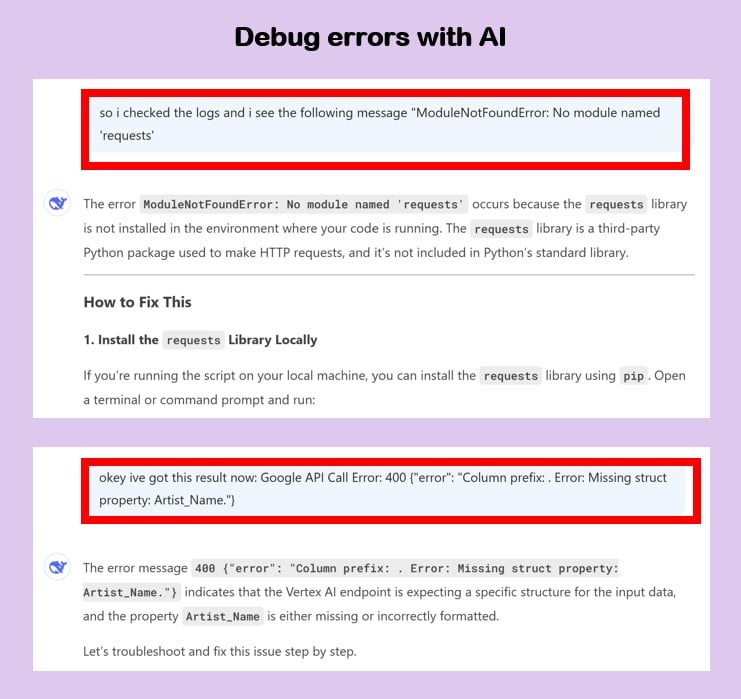
As a good product manager, intensity runs in my blood: I also want features to be in production as fast as possible. However, when facing this challenge of coding with GenAI chatbots’ help, I had to learn the virtue of patience. Indeed, I’ll warn you now that the code ChatGPT or Deepseek generates won’t work well on the first try. This happens because, no matter how much context you provide, these tools can get confused trying to respond to your request. The good news is that GenAI platforms excel at being the best allies in debugging—meaning they help you find errors in your code. Don’t think twice and pass them the error so they can advise you.
Personal example: After sharing several of my errors, Deepseek started pointing out possible solutions in my Python code and even suggesting I incorporate more lines to record data in logs, giving me more clues about the error. After some attempts, I started seeing the output and was able to fix the faulty code. It’s simply wonderful.
5) Order Is Key When You Scale Up Prompt Size
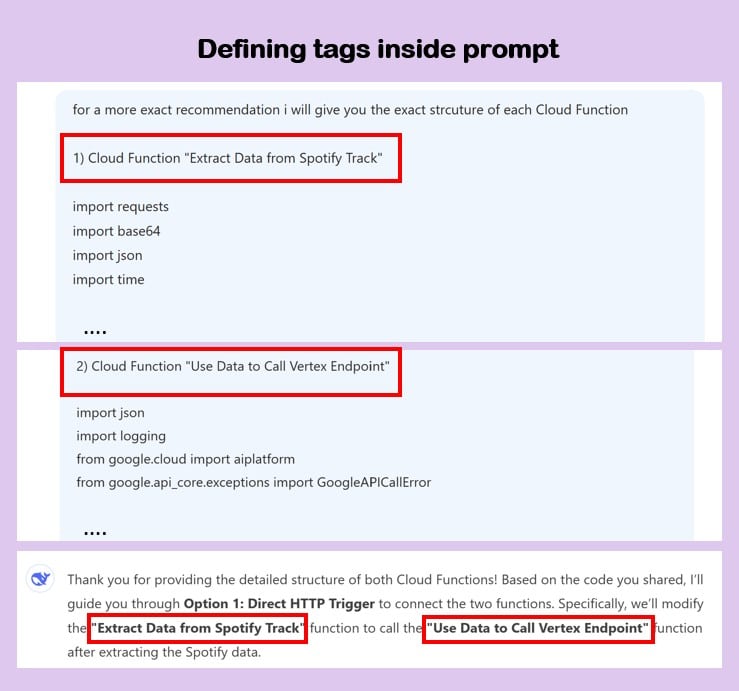
As hours passed, my web app became increasingly complex. Also, as I mentioned earlier, I was forced to iterate between ChatGPT and Deepseek to avoid costs. Faced with this scenario, I started having a justified fear: when switching from one platform to another, I’d likely start omitting relevant context about the app I was building. This is where everything could have gone downhill. However, the solution I came up with was to be extremely organized with my prompts by assigning “labels” to the architecture modules I was building. I also started being more precise (e.g., “step 1,” “step 2”) in reference to the long responses the chatbots sometimes gave me.
Personal example: When I had to ask for code to create an orchestrator API (one that calls several APIs at once), I decided to assign a name to each API according to the function it performed (e.g., “Extract Data From Spotify Track” and “Use Data to Call Vertex Endpoint”). This way, whenever I wanted to reference it, I only had to mention its name in the chat to make the model’s job easier.
6) Building the Front End Is Brutally Fast (And Publishing It Even More So)
At the end of day 4, when I finished the back end, I was on cloud nine, and thought assembling the front end would take just as many hours. Reality was different. With help from Vercel’s chatbot, I was able to build a simple webpage tailored to what I was looking for. From the suggested language (Node.js) to the required files, everything flowed quickly. What’s more, the GitHub integration functionality made it possible to publish my web app on a public URL with just a few clicks. My suggestion is to leave the front end for last, since it’ll likely take you little time in the process.
Personal example: This was my first time using Vercel, so I tried to be as specific as possible from the start by stating my project’s general objective. Then, after a couple of interactions, I asked for specific instructions to launch the website on a public URL.

* * *
Final Reflection
Literally, this project went from 0% to 100% in a matter of hours or days. Truthfully, this article falls short of telling you about all the learnings I gained from this whole process. “Hey DJ Fer” has been an experiment to reconnect with my most self-taught side and explore a use case that demonstrates (once again) the power of LLM models.
Resources Used in Hey DJ Fer
Project on Github: https://github.com/fperezt30/heydjferv3.0
Project’s public URL: https://v0-hey-dj-fer.vercel.app/ (I’ve temporarily turned off the project’s API because I ran out of free credits on Google Cloud Platform)
Google Cloud Platform: https://cloud.google.com/ (They give you around $300 to use the platform for free, super practical)
Spotify API Documentation: https://developer.spotify.com/documentation/web-api
Vercel integration with Github: https://vercel.com/docs/deployments/git (they let you publish your website for free)
